Archiving, Soft Delete and Hard Delete Policies
Category: Project Management Section: Projects Last Updated: 2024-08-22
Projects users now have the ability to set archiving and delete policies to cover data and documents within a Project. These policies allow the tenancy admin to proactively reduce data risk by archiving and deleting documents and their associated data after a specific period of time.
Archiving
Archiving moves a project from the My Projects tab in Projects to the Archived Projects tab.
Archiving a project will also remove it from calculations in any project-related dashboard widgets.
A project can be archived manually via the project actions or automatically via an archiving policy
Archiving by policy
As an admin you can create a policy to set when projects will get archived by the system. You can find this under Record Policy Actions in the left hand menu.
You can define rules for Projects with a status of either New, In Progress or Completed and set them to be archived after a certain number of days.
Manual Archiving
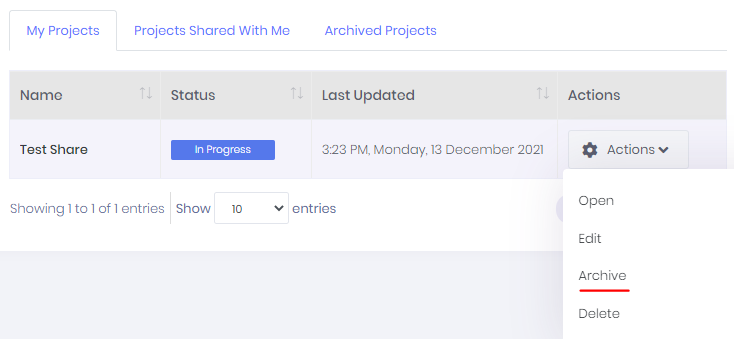
If there are no archiving policies set, or if the archiving policy has not yet taken effect, a user can also elect to manually archive a project. This can be achieved simply by selecting 'archive' from the actions list on the relevant project.
Archived Projects
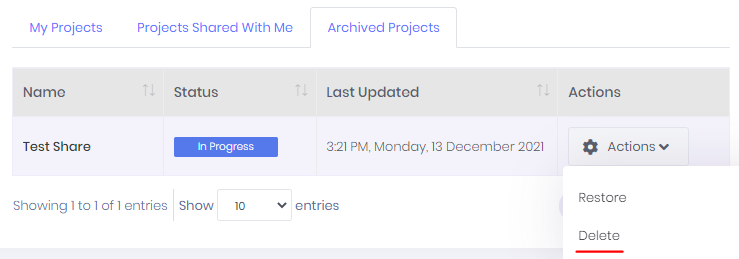
In the Archived Projects tab, users can view, restore or delete (soft delete) an Archived project from the actions menu.
Soft Delete
Soft Delete removes a project from all views in Projects, but not from the database. Projects that have been soft deleted can be restored from the database by the Syntaq team.
As with archiving, Soft Deleting a project can be achieved manually or by meeting conditions set out in a Soft Delete Policy.
Soft Deletion by Policy
As an admin you can create a policy to set when projects will get soft deleted by the system.
Soft deletion policies will run on any previously archived project, and that project will be soft deleted after the specified number of days.
Manual Soft Delete
A user can soft delete a project by clicking on delete in the actions menu. This can be done regardless of whether the project is archived or not.
Hard Delete
Hard delete is when a Project and all its associated data is deleted from the database. There will be no record in the database once the process is run and we will not be able to restore these records. This can only be completed through a Hard Delete Policy.
Hard Deletion by Policy
As an admin you can create a policy to set when projects will get hard deleted by the system. Hard deletion policies will run on any previously soft deleted project, and that project will be hard deleted after the specified number of days.
Hard Delete Actions
You cannot hard delete a project manually as there is no UI to access soft deleted projects.