Inserting a File Download Button into your form
Category: Form Builder - Toolbox Section: Field Types Last Updated: 2024-08-22
SYNTAQ's form builder has a ‘File Upload’ control that you can use on your forms to allow users to upload a file when they are filling out a form. But you may be wondering how you can put a link on your form that enables the person filling out the form to download a file. You may want to do this if you are providing some hard-copy information.
The best way to do this is to:
Upload a copy of your file onto a public file sharing service, such as dropbox.com;
Make the file on the file sharing service accessible to anyone who has a copy of the link
NOTE: Be careful if you change the location of the file as this will break the link on some file sharing services. We suggest you set up a particular folder on your dropbox (or similar) account specifically for your SYNTAQ downloads.
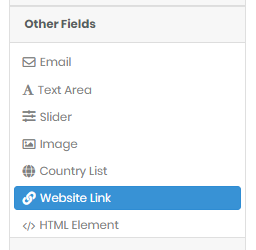
Drag a Web Link control onto your form (found under the Other Fields tab in the form builder):
Nominate the file location link in the Link Address property of the Web Link control. Note that the url does not need to contain the link protocol
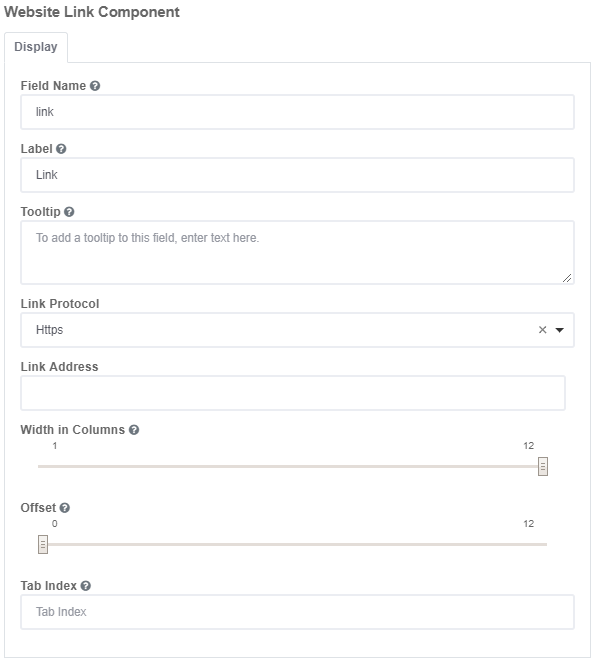
Ensure that the Link protocol is correct.
You’re done!
You can also do the same thing within an HTML control by making a part of the text within the HTML block as a link.